Cloud-native engineering simulation

From geometry to engineering insight, in one workspace.

Prepare CAD, generate a production mesh, configure the physics, and run GPU-native CFD without leaving the browser. Studio keeps the workflow traceable while automating the decisions that do not need manual intervention.

Start with CoreExplore the workflow
Proprietary GPU solversAutomated meshing workflowsOpen result formats
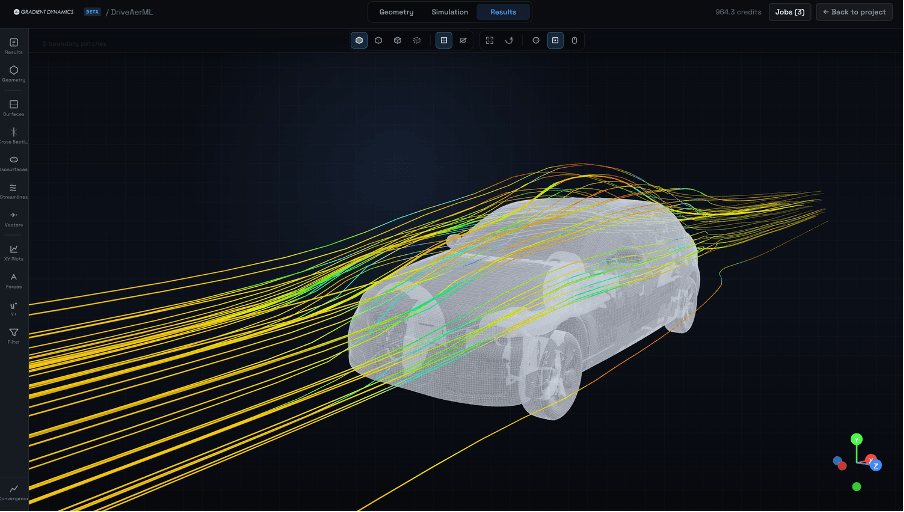
Live engineering workspaceGeometry · Mesh · Simulation · Results
Gradient Dynamics Studio showing DrivAerML results with streamlines
DrivAerML external-aerodynamics result with surface and streamline visualisation
A single, connected workflow
01
Import
STEP, IGES, STL, OBJ, PLY
02
Prepare
Repair, inspect, name surfaces
03
Mesh
Automated octree and prism layers
04
Configure
Materials, boundaries, operating point
05
Solve
Automatic FluxCore strategy on GPU
Engineering workspace

The controls engineers need. The automation they expect.

A coherent environment for geometry preparation, automated meshing, physics setup, cloud execution, and result review—without stitching together desktop tools.

Automated Meshing

Generate body-fitted octree meshes with prism layers, automated sizing, local refinement, and quality checks.

CAD Preparation

Import engineering geometry, inspect topology, repair common issues, create named selections, and prepare simulation domains in the browser.

Automatic Solver Strategy

Studio interprets the domain and boundary conditions, then selects the appropriate solver workflow automatically.

Production RANS

Run robust steady-state studies with k-omega SST or Spalart-Allmaras and solver-owned numerical defaults.

Rotating Machinery

Configure steady MRF zones for fans, impellers, propellers, and wheel studies with clear region and boundary-condition controls.

Results and Open Export

Review solver progress, inspect fields, generate reports, and export open result formats including VTK and CGNS.

01
Workspace from CAD to results
Octree + prism
Automated proprietary meshing
GPU-native
FluxCore solver architecture
VTK + CGNS
Open engineering outputs
Use cases

Built for applied engineering studies

A focused workspace for teams that need repeatable setup, traceable assumptions, and fast iteration on real geometries.

External Aerodynamics

  • Vehicle drag and lift
  • Drone airframes
  • Building wind loads

Internal Flow

  • Duct and manifold design
  • Pipe pressure drop
  • Valve studies

Rotating Machinery

  • Fans and propellers
  • Impellers
  • Steady MRF studies

Design Iteration

  • Mesh sensitivity
  • Boundary-condition variants
  • Shared reports
Why Studio

Less infrastructure, more engineering throughput

Studio reduces the setup burden around CAD preparation, meshing, solver configuration, and result handoff without hiding the controls engineers need.

Traditional setup

  • Desktop preprocessing tools
  • Manual mesh setup and handoff
  • Local workstation or cluster dependency
  • Separate files for setup, solve, and review
  • License and infrastructure administration

Gradient Dynamics Studio

  • Browser-based preprocessing workspace
  • Automated mesh generation with quality checks
  • Cloud GPU solve queue
  • Project-based setup, results, reports, and export
  • Predictable monthly compute allocation with open exports
Gradient Dynamics Studio

Move from a new geometry to a running case with less setup overhead.

Start with Core